Learning Modes
Classic study session
Hear each card read aloud, recall the answer, reveal it and grade yourself by tap or by voice word.
What it does
The classic session reads each card to you, gives you time to recall the answer, then reveals it and reads it out. You grade the card Again, Hard, Good or Easy, and the spaced-repetition schedule decides when it comes back. You can grade by tapping or, with Hands-free mode on, by saying the grade word. Visual Review is the on-screen version: cards are not read aloud, you read the card and tap Flip Card.
How to use it
- Open the Library tab and tap a pack.
- Tap Review N Due Cards (N is the number of cards due), or Start Session when none are due. Tap Visual Review instead for the on-screen version.
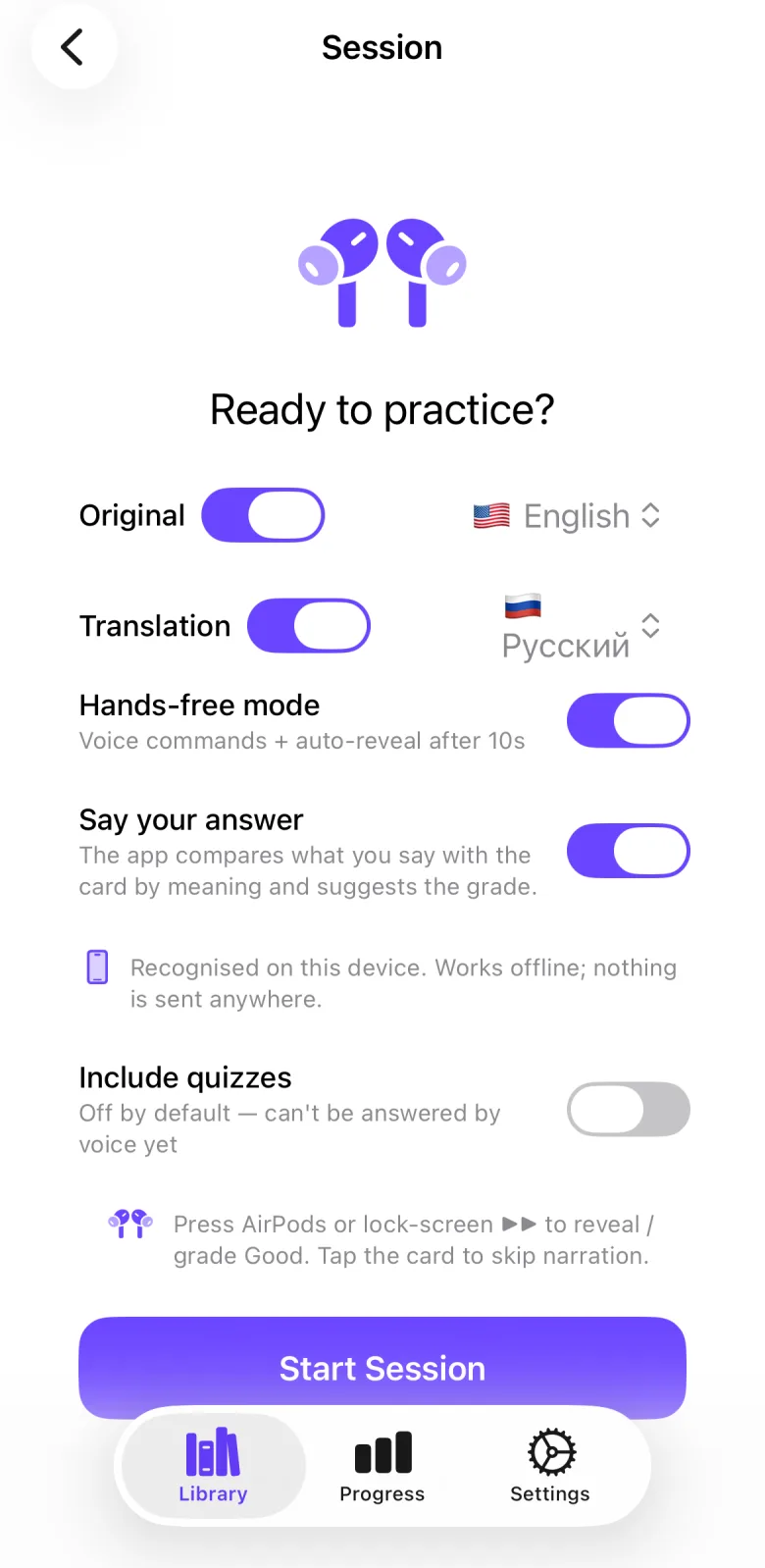
- On the Ready to practice? screen, use the Original and Translation rows to choose which languages are read and in which language. At least one of the two stays on.
- Switch on Hands-free mode if you want to grade by voice. The app then asks for microphone and speech recognition access.
- Tap Start Session. The card is read aloud.
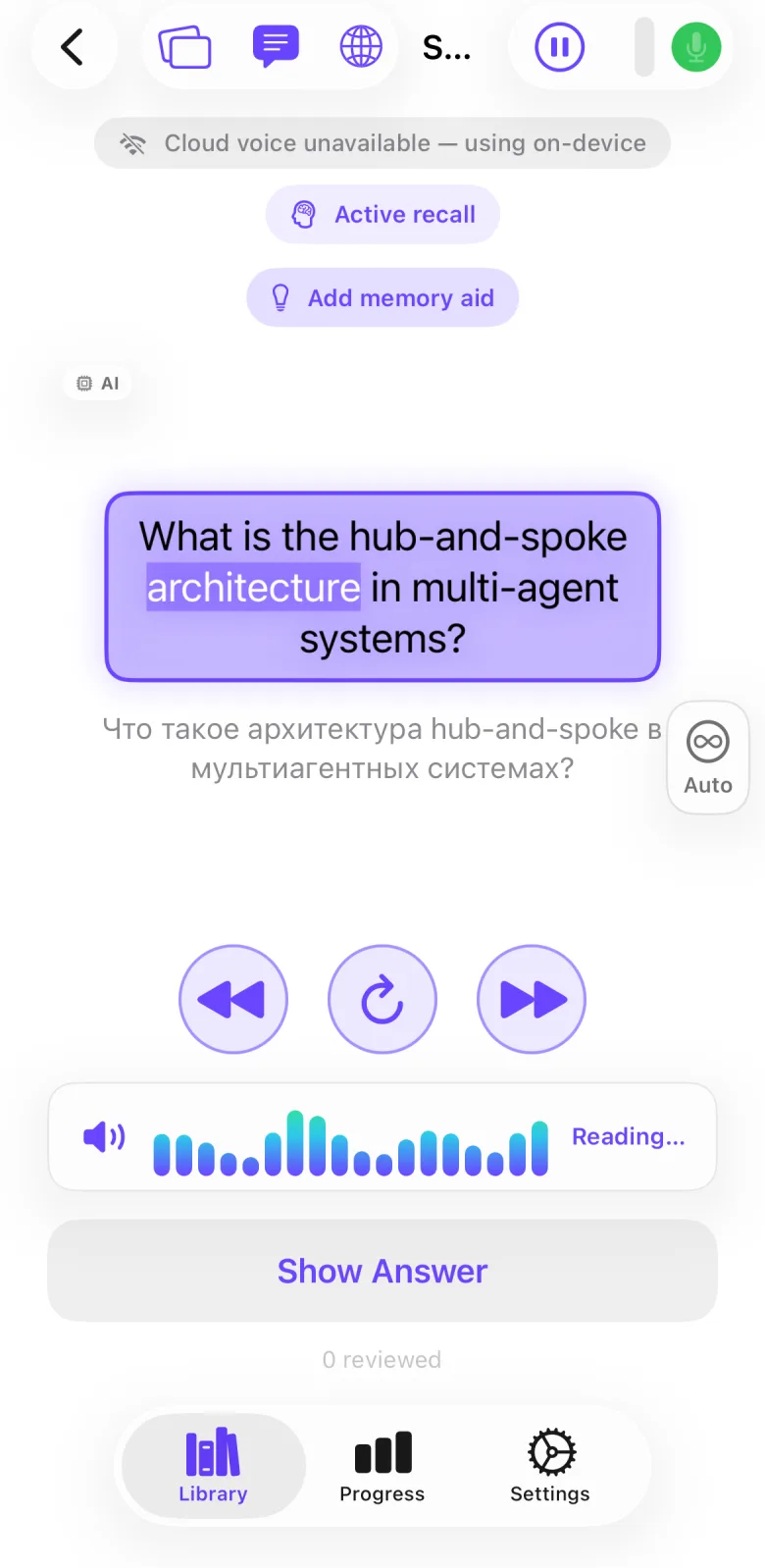
- Recall the answer. In hands-free mode a countdown ring runs and the answer is revealed when it ends. Otherwise tap Show Answer. The answer is read aloud.
- Grade the card: tap Again, Hard, Good or Easy, or in hands-free mode say the word. The buttons and the spoken words use the language set in Settings → Speech Recognition → Language.
- Under the card, Previous block, Re-read card and Next block step through what is read. The pause button at the top right freezes the session.
- When no card is left, All caught up appears. Tap End Session to see Session complete with cards reviewed, duration, accuracy and your grade counts, then tap Done.
Settings that affect it
- Settings → Speech Recognition → Language — the language of the grade words you say and of the labels on the four grade buttons. A new install starts with Russian (ru-RU), so choose your language here first. With Say your answer on, the pack’s language is used instead. See the speech recognition manual.
- Settings → Session → Hands-free by default — starts audio sessions with Hands-free mode already on. Off by default. You can also switch it per session on the start screen.
- Settings → Session → Recall Pause — the hands-free countdown before the answer is revealed, 3 to 30 seconds. Default 10 seconds.
- Settings → Session → Between Cards Pause — the hands-free window after the answer in which you can still grade, 1 to 30 seconds. Default 10 seconds.
- Settings → Session → Auto-speak answer — reads the answer aloud when it is revealed. On by default.
- Settings → Session → Translation Delay — the gap between the original and its translation, 0.5 to 5 seconds. Default 1.5 seconds.
- Settings → Session → Auto-advance (passive autoplay) — in hands-free mode, opens the between-cards countdown after the answer without waiting for you. Off by default.
- Settings → Session → Include quizzes — adds quiz questions to the session. Off by default. See the quiz mode manual.
- Settings → Session → Focus session (beta) — switches audio sessions to the Focus session. Off by default.
Limits and honest caveats
- Hands-free mode is off by default. Without it the session has no countdown and no voice grading: you tap Show Answer and the grade buttons.
- Hands-free mode needs microphone and speech recognition access. If you refuse, the app shows Voice Commands Unavailable and you can choose Continue Tap-Only.
- With Auto-advance (passive autoplay) on in hands-free mode, a card you do not grade before the between-cards countdown ends is graded Good. Say or tap another grade before it ends if you disagree.
- Visual Review does not read cards aloud and has no voice commands. Tapping a grade button there still runs the grade feedback: with Speak grade aloud (again / good …) on, the app says the grade word, and with Command feedback on it plays tones and a vibration.
- The spoken voice is set in Settings → Voice. The in-app AI disclosure says that with premium voices the text of the card you play is sent to our server and a third-party text-to-speech provider, and that the app falls back to the on-device voice if that is unavailable.
- Quizzes cannot be answered by voice. They appear only when Include quizzes is on.
FAQ
How do I answer without touching the phone?
Switch on Hands-free mode on the start screen, or turn on Hands-free by default in Settings. After the countdown the answer is revealed and you say Again, Hard, Good or Easy. The words must be in the language chosen under Settings → Speech Recognition → Language, not necessarily the pack’s language. The app does not hear commands while it is speaking.
Does the session need a network?
Starting a bundled pack or a pack you created needs no check with our server. A private course pack you are signed in for is checked with the server when you start it. Whether the voice and the speech recognition use the internet depends on the voice and language you choose; see the speech recognition manual.
Can I switch between listening and reading during a session?
Yes. A button at the top left switches between audio mode and visual mode while a session runs.
Why did a card get a grade I did not choose?
With Auto-advance (passive autoplay) on in hands-free mode, an ungraded card is graded Good when the countdown ends. With Say your answer on, the app suggests a grade from what you said and applies it unless you change it.
What do the numbers on the last screen mean?
Accuracy is the share of reviewed cards you did not grade Again. The other numbers are cards reviewed, duration and how many cards got each grade.